
This is the final post in a four-part series on ALT text. Because writing it well (and knowing when not to write it) deserves more than a quick checklist. See part three, ALT Text Is Read by AT, Search Engines, and AI—Write It Like It Matters. See part one, ALT Text Isn’t a Description. It’s a Content Decision.
Too often, guidance on ALT text is reduced to a list of dos and don’ts, failing to explore how to think about images that convey meaning or drive action. Informative (also referred to as informational) and functional images do both, demanding more than surface-level description.
To write effective ALT text for these images, focus on what the images communicate and the value they deliver, whether that’s the insight they share or the action they trigger. That shift is what makes informative and functional images genuinely accessible.
Informative Images: Images That Add Meaning
Informative images are photos, illustrations, charts, or diagrams designed to convey specific, meaningful information. Their purpose is to support, enhance, or complete the textual content of a webpage. Without the image, the user would lose context, clarity, or critical detail. Unlike decorative images, informative images are essential to the message.
Example
You have a webpage that provides instructions for inserting a SIM card into a phone. The text reads: With the gold contacts facing you, insert the SIM card into the SIM slot .
You might include an image like this to provide visual context.

The ALT text would read something like this: <img alt="Insert the SIM card into the SIM slot located on the left side of the phone, just below the power and volume control buttons." src="/images/sim-card-in-slot.png">
Because the SIM card's placement and orientation matter (gold contacts facing the person), the image supports the text by providing additional information on the proper placement. It helps prevent user confusion, frustration, and potential errors.
Writing ALT Text for Informative Images
When developing ALT text for an informative image, keep in mind that if it doesn’t help someone understand the surrounding content or complete an action (like the example above), it doesn’t belong in the ALT text.
Lead With the Purpose, Not the Appearance
Start by asking: Why is this image here? What does it add to or support the meaning of the content?
If the image explains a step, clarifies a concept, or shows a result, your ALT text should communicate that.
For the image below, instead of writing - A photo of an arrow pointing to a button.
write this - Select the Submit Application Now button located at the bottom of the application page.
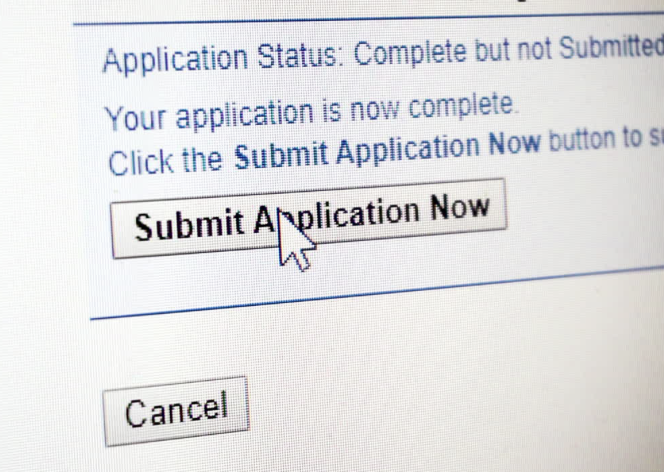
If removing an image from a webpage would also remove critical information, context, or meaning, then the ALT text must convey that content. If an image conveys information such as essential labels, critical figures, directional cues, or procedural steps that the textual content does not, that information must be included in the ALT text. If the image is responsible for telling part of the story, the ALT needs to fill in the gaps.
💡Pro Tip: Informative doesn’t mean verbose. If an image contains complex instructions, highly detailed maps or graphs, or other dense data, it may require a longer text description rather than cramming everything into the ALT.
There are several alternatives to explore to ensure you provide the necessary intentional content and make it accessible, keeping in mind that each of these comes with its own set of best practices:
- Provide the image's meaning and purpose within the surrounding content.
- If possible, reduce the complexity of the image.
- Use a long description that is accessible to all users.
- Look into the use of the less familiar <figure> and <figcaption> elements.
Functional Images: Images That Do Something
A functional image initiates an action. It's not decoration or explanation.
For functional images (icons, buttons, linked graphics), the ALT text should describe what the image does, not what it looks like. That clarity directly impacts usability. A magnifying glass icon is a decorative detail, a noun. Search has an actionable meaning. It's a verb.
Examples
Note: The images and blue, underlined text shown below are for demonstration purposes only. They illustrate the concept but are not interactive or functional as presented.
Image Used Alone as a Linked Logo
In the primary navigation of the DubBot website, the DubBot logo on the left side of the page serves as a functional image, linking users to the DubBot homepage.
The ALT text for the DubBot logo image reads like this: <img alt="DubBot homepage" src="../_image/dubbot-primary-logo.jpg">, with the word homepage included to signal users where the link will take them.

Image Conveying Information Within Link Text
Here, the text and the image are both enclosed in the href tag, creating the link. The image’s purpose is to inform users that they can download the PDF file.

ALT Text Is Content, Not Just Compliance (PDF)
The ALT text would read something like this: <img alt="Download PDF" src="/images/content-not-compliance.png" >
The code, including the href, would look like this:
<a href="../pdf/alt-text-is-content-not-compliance.pdf"><img alt="Download PDF here" src="/images/content-not-compliance.png" >ALT Text Is Content, Not Just Compliance</a>
A Stand-Alone Image That Has a Function
This image, showing a paper and pencil, indicates that Edit Mode can be activated for a digital document.
The ALT text would read something like this: <img alt="Edit This Page" src="/images/edit-mode-icon.png">
Image Used as a Button
If you use an image as a button, the ALT text must include the purpose or action the button performs.
For the image button above, with text that reads Apply Online, the ALT text would read something like this: <img alt="Apply Online Here" src="/images/apply-online-button.png" >
Note: The examples above come from the W3C page on Functional Images. Logo image within link text is discussed in the second post in this series, The Most Accessible ALT Text Is Sometimes No ALT Text at All; therefore, it is not included above.
Writing ALT Text for Functional Images
When developing ALT text for a functional image, keep in mind that if it doesn’t tell the user what will happen, when, or where they will go, it fails, no matter how accurate the description is.
Use Concise, Verb-Driven Language
Functional images trigger an action - apply online, edit the page, download the file, go to the DubBot homepage - so start with the verb that describes that action. The verb makes the purpose instantly clear, especially for screen reader users navigating quickly through interactive elements.
Match the Visible Label
If a functional image includes a visible text label, such as Download PDF, the ALT text should match that wording exactly to reduce confusion for screen reader users.
Include the Destination or Action Outcome
If the image links to a meaningful destination, specify the destination. If the image triggers something, your ALT text should tell users exactly what that something is.
Bringing it All Together
Image accessibility moves forward the moment we shift from What does this look like? to Why is it here? Most image-related accessibility issues aren’t caused by missing ALT text. They are caused by not having the right ALT text, and that distinction makes all the difference.
If we want to create a genuinely inclusive web, the shift starts with perspective. ALT text is not just a technical or legal requirement; it is an editorial choice that determines whether and how purpose and meaning are conveyed and who gets full access. It’s time to move beyond describing what an image looks like and instead communicate the meaning and value it brings to the experience.
Resources
- An Alt decision tree
- ALT Text - Tips & Tricks
- Web Accessibility Initiative: Informative Images
- Writing good alt text sounds simple until you actually try
A human author creates the DubBlog posts. The AI tools Gemini and ChatGPT are sometimes used to brainstorm topic ideas, generate blog post outlines, and rephrase portions of content. Our marketing team carefully reviews all final drafts for accuracy and authenticity. The opinions and perspectives expressed remain the sole responsibility of the human author.
