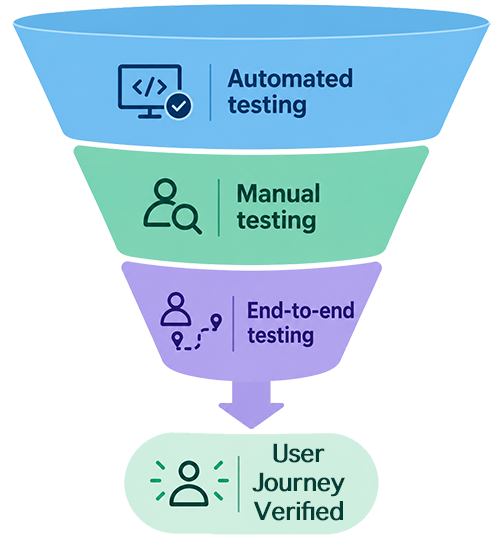
A website can pass automated and manual accessibility checks and still fail someone trying to accomplish a task.
A form might have accessible labels. A button might work with a keyboard. Every page might pass an accessibility audit. But if someone tries to register for an event, apply for a job, or make a purchase and can’t complete the task, those individual accessible components aren’t working together to create an accessible experience.
That’s where end-to-end (E2E) accessibility testing comes in.
What Is End-to-End Accessibility Testing?
I first heard the term end-to-end testing during the DigiCol Accessibility Summit in July. I was already familiar with concepts like user journey, journey mapping, and critical path from my work in UX, so the idea of end-to-end testing wasn’t entirely new to me. What was new was applying that way of thinking to accessibility testing.
There are various ways to conduct accessibility testing, and each has a different level of focus:
- Automated testing identifies common, detectable accessibility issues, such as missing form labels or insufficient color contrast.
- Page-level manual testing examines how people interact with an individual page using keyboards, screen readers, and other assistive technologies.
- Component testing evaluates individual interface elements, such as navigation, buttons, or drop-down menus.
- End-to-end testing brings these levels of focus together to evaluate the entire user journey from start to finish.
Each level of focus is valuable in its own right and should be part of your comprehensive, ongoing accessibility strategy. But end-to-end testing shifts the focus from whether individual pages and components are accessible to whether they work together to help someone accomplish a real goal.
Users Have Goals, Not Test Cases
Traditional accessibility testing often gets broken into testing the navigation, testing the form, testing the table, etc.
Those are all very necessary, but people don't come to your website to test the navigation or validate your forms. They come with a purpose and a goal.
They come to your website to register for an event, find information, submit an application, or complete a transaction. Your accessibility testing should follow the user’s path required to accomplish their goal, not just your website's structure.
Scenarios can help. An end-to-end testing scenario helps you evaluate whether someone can move through an entire process, recover from any mistakes, and receive confirmation that the task is complete. This is testing real-world context, not just whether an interaction works.
Build Your Scenarios Around Tasks, not Components
Start with a user goal and build a scenario around the path a person needs to take to accomplish it. First, test the happy path, the expected outcome from beginning to end. This ensures all components and interactions work together. Then test errors and alternate paths, things like missing required information, invalid entries, proper tab order, and error recovery, to identify issues that could prevent someone from reaching their goal.
For example, test the user path for registering for an event.
First, identify your user. In this example, your user navigates with a keyboard and screen reader and wants to register for an upcoming event.
Follow the required steps, confirming the user can:
- Find the event through navigation, search, or a listing.
- Identify the event's title, date, time, location, and registration requirements.
- Activate the registration button and understand the resulting page or dialog.
- Navigate the form in a logical order, ensure focus is visible, understand each field, and enter the required information.
- Identify required fields and submit the form without a mouse.
- Recognize validation errors, understand what needs correcting, and return to the affected fields.
- Complete any additional steps, such as agreeing to terms or choosing a session.
- Submit the registration and receive a screen-reader-accessible confirmation with the relevant event details.
Next, discover what happens when a session is full, a required field is missed, or the submission takes longer than expected.
Scenarios You Should Consider
Start with the scenarios that matter most to your users. Prioritize based on user needs, business impact, and the consequences of an inaccessible experience. Here are a few suggestions to help get you started:
Find Information
Search for a topic and locate a specific answer.
Create an Account
Register, verify an email address, and sign in.
Recover Access
Reset a password, return to the account, and receive confirmation.
Complete a Purchase
Find a product, add it to the cart, check out, and receive confirmation.
Submit an Application
Find an opportunity, complete the form, upload documents, submit, and receive confirmation.
Make an Appointment
Select a date, an available time, add a subject or note, and receive confirmation.
Contact Support
Find contact options, submit a request, and verify confirmation.
Manage an Account
Update personal information, save changes, and confirm the update.
Making The Connection
Automated testing can identify individual accessibility issues. Manual testing can investigate specific user experiences. End-to-end testing connects the two, evaluating accessibility in the context of the user’s actual goal.
That connection matters. It’s where accessibility testing delivers its greatest value: ensuring everyone has the same opportunity to use your website, complete their tasks, and achieve their goals.
Resources
- Accessibility Testing Protocol
- Sample User Stories for Accessible ICT
- Choosing pages to test: Constructing a user journey
- Shifting Left with Cypress End-to-End Accessibility Tests (PDF)
A human author creates the DubBlog posts. The AI tools Gemini and ChatGPT are sometimes used to brainstorm subject ideas, generate blog post outlines, and rephrase certain portions of the content. Our marketing team carefully reviews all final drafts for accuracy and authenticity. The opinions and perspectives expressed remain the sole responsibility of the human author.
