
Last week, I was involved in an automobile accident. (No injuries with either driver.) My little Kia Soul sustained some pretty extensive damage. I’ll admit, it was pretty scary. It definitely shook me up.
When I finally got home and took a breath, I logged on to my insurance company’s website and submitted the claim. Pretty painless, which was a welcome relief after the day I had had.
The next morning, still a little shaken, I logged on to get information about my deductible. I don’t know what happened overnight, but my insurance company’s website suddenly became a painful and very frustrating experience.
On the home page, I saw a box titled Your Recent Claim with links to View Claim and Message Auditor. I clicked View Claim. The page opened with a claims status message. Great. As I began scrolling, I found options such as View Investigation Process, Message an Adjuster, and eventually View Coverage Details. I clicked View Coverage Details.
The link opened a large pop-up box with sections titled Claim Type, Estimates and Payments, and Coverages. Each coverage type had a link that opened another pop-up box defining that specific coverage, but it did not include deductible information.
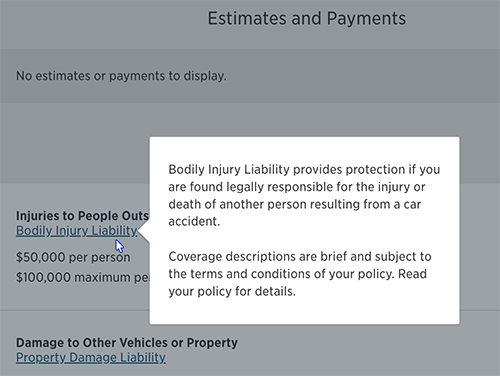
And this is when the site quickly became confusing. Unlike the first large pop-up box, this second, smaller box did not have an X in the upper right corner to indicate how to close it. In fact, there was no X, close button, or text indicating how to close the pop-up. You had to figure out that either clicking the link again or clicking outside the pop-up box would close it. The links to the coverage types were actually toggle switches. That interaction required some mental cartwheels, as the open / close process was very different from the norm.
After giving up on finding information about my deductible in this section, I reverted to the primary navigation at the top of the page. I clicked Insurance. I was presented with a page listing numerous headings: Vehicle Insurance, Property Insurance, Life Insurance, Medical Plans, etc. And beneath several categories was a long list of sub-options.
Under the heading Vehicle Insurance, there was an option titled Auto. Bingo! I finally found the path to my deductible information. Wrong! That link brought me to a page for new customers. Not at all what I needed. Right about that time, a familiar U2 song started playing in my head. 🎶
I started over. I clicked Insurance in the primary navigation again and got the laundry list page. This time, on the right side, I noticed a bulleted list (the bullet points were little icons corresponding to the link text) on a grey background with about 7 options, one of which was Manage Auto and Property Insurance. <sigh of relief> Finally.
I clicked the link. There were several boxes with several options for policy management - Billing, Update Address, Get ID Cards, etc. Then I saw it, the box titled View Auto Policy. I clicked it. And there it is. A heading titled Ways to Manage Your Policy, and under that heading, a link labeled View Coverages and Deductibles. 🥳 I had done it. I had conquered the poor usability and inaccessibility of this website and found what I was looking for.
The page opens, and I see the heading Vehicle coverage and deductibles. I scroll, and I scroll. I see all the coverage types I don’t have, the amounts and limits for the coverage types I do have, and, at the very bottom, my insurance premium details. And even more interesting (and frustrating if I were using a screen reader), the page is peppered with links labeled Learn More. 🤦🏼♀️
Are you exhausted yet? Are you tired and frustrated that you have read all the way to this point, and there is still no resolution to this story?
You now know my feelings after spending what felt like the entire morning looking for one simple nugget of information. I won’t drag this out much further. I promise.
Eventually, I had to break down and click the Chat link in the top navigation. And after clicking several prompts that yielded nothing but more prompts, I had to ask for a live person.
I'd like to pause here and give DubBot’s Support Team a shout-out for always having a real person on the other end of the blue chat bubble found in the lower-right corner of any DubBot or DubBot Help Doc webpage. 🙌🏼 📣
The live helpdesk person was very helpful and polite, but the process was still a mess. She let me know that I needed to go to the My Documents section of my account. (Why wasn’t that option available when I was on the page titled Vehicle coverage and deductibles?) Once there, I was instructed to scroll a long list of insurance-related documents, 75% of which were receipts for premium payments. So I scrolled past approximately 17 documents before finding the sout-after date - the date being the last renewal date of my policy. What??
The document opened in some kind of viewer, and I was told to find the Collision and Comprehensive Coverage section. I had to search and scan for a header with that title since I couldn’t do a search-and-find for the words deductible or deduct because the information was in a viewer and not a simple webpage or even a PDF. The viewer also will not let me download the document.
So, after scanning the document from top to bottom, I FINALLY found what I was looking for. That little number, nested at the bottom of a column with the heading VEH 14 D=DED AMOUNT.
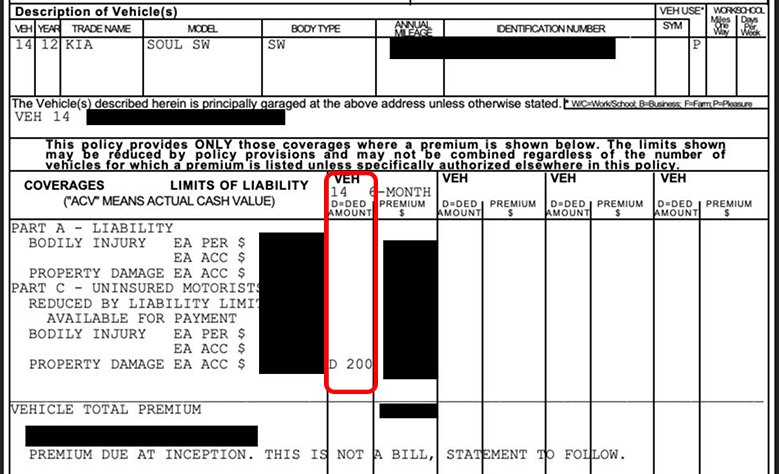
What should have been a simple task, finding my deductible, turned into a lengthy, confusing, and unnecessarily complicated process that required excessive cognitive load (which the prior day’s events had already instilled) and eventually, assistance from customer support.
I share this experience to serve as a reminder that accessibility should never be optional. While much of the recent attention has focused on state and local government compliance, private-sector organizations also have a responsibility to provide accessible digital experiences and must be made to adhere to accessibility requirements under the ADA and, where applicable, Section 508, making sure everyone can find information, complete tasks successfully, and engage with digital content without frustration, guesswork, and confusion.
A human author creates the DubBlog posts. The AI tools Gemini and ChatGPT are sometimes used to brainstorm subject ideas, generate blog post outlines, and rephrase specific sections of content. Our marketing team carefully reviews all final drafts for accuracy and authenticity. The opinions and perspectives expressed remain the sole responsibility of the human author.
