A session timeout is when a website or app automatically logs you out after a period of inactivity. They are often regarded as a fundamental safeguard driven by legitimate security concerns. Think of them like a safety timer. If you walk away or stop using it for a while, the system assumes you’re done and ends your session to protect your account and data.
But when time limits are rigid, invisible, or unforgiving, they don’t just protect account data; they can exclude users, create frustration, and even block people from completing essential tasks.
How a Session Timeout Can Become a Session Barrier
For users with cognitive disabilities, mobility impairments, or those using assistive technology, inactivity doesn’t always mean they've completed the task or abandoned the process. It often means they’re simply taking the time they need.
At their core, session timeouts impose time limits on user interaction. These time limits can create real barriers for people who need more time to read, navigate, or complete tasks, especially users with cognitive, motor, or visual disabilities. When a session expires unexpectedly, users can lose their progress, context, or even access altogether.
The Real Issue isn’t Timeouts, it’s Design
The problem isn’t that session timeouts exist. The problems arise from how session timeouts are designed. Often, they are designed around system actions instead of human behavior.
A user navigating with a screen reader may still be actively working while appearing idle. Someone with a motor impairment may need significantly more time to complete a form. And users with cognitive disabilities may rely on consistency and an uninterrupted flow to stay oriented. Or a user completing a financial aid application needs to stop to answer an important phone call.
WCAG SC 2.2.1 Timing Adjustable (Level A) provides clear guidance emphasizing that users must have enough time to complete tasks or be given control over time limits. The criterion states:
For each time limit that is set by the content, at least one of the following is true:
Turn off - The user is allowed to turn off the time limit before encountering it; or
Adjust - The user is allowed to adjust the time limit before encountering it over a wide range that is at least ten times the length of the default setting; or
Extend - The user is warned before time expires and given at least 20 seconds to extend the time limit with a simple action (for example, press the space bar), and the user is allowed to extend the time limit at least ten times; or
Real-time Exception - The time limit is a required part of a real-time event (for example, an auction), and no alternative to the time limit is possible; or
Essential Exception - The time limit is essential and extending it would invalidate the activity; or
20 Hour Exception - The time limit is longer than 20 hours.
WCAG SC 2.2.6 Timeouts (Level AAA) expands on this guidance by requiring transparency. It states you must Tell users how long their session can be inactive before they may lose information.
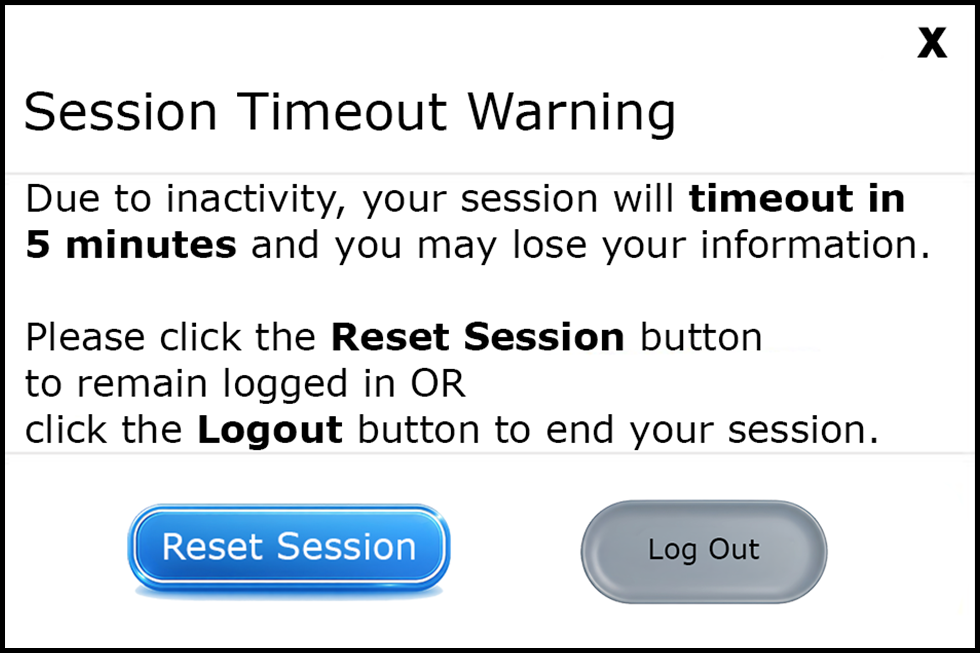
This example informs the user that they have 5 minutes before their session times out and closes. This timeout message includes an option to reset the session and remain logged in, or to log out and end the session. This is an example of thoughtful design.
Building accessible session timeouts doesn’t need to be complicated. It just calls for thoughtful intention. Designing session timeouts with flexibility and transparency turns a potential barrier into a point of user empowerment. When people can anticipate timing, extend sessions when needed, and avoid losing work unexpectedly, they’re far more likely to complete tasks successfully.
The opportunity here is bigger than just compliance and the protection of accounts and data. Thoughtful session timeout design conveys respect for your users’ time, attention, and effort. It shifts their experience from you ran out of time to we designed it for your success, respecting how real people actually work.
Resources
- Manage a Session Timeout
- 10 Web Session Timeout Best Practices
- Session Timeouts: The Overlooked Accessibility Barrier In Authentication Design
A human author creates the DubBlog posts. The AI tools Gemini and ChatGPT are sometimes used to brainstorm subject ideas, generate blog post outlines, and rephrase specific sections of content. Our marketing team carefully reviews all final drafts for accuracy and authenticity. The opinions and perspectives expressed remain the sole responsibility of the human author.
