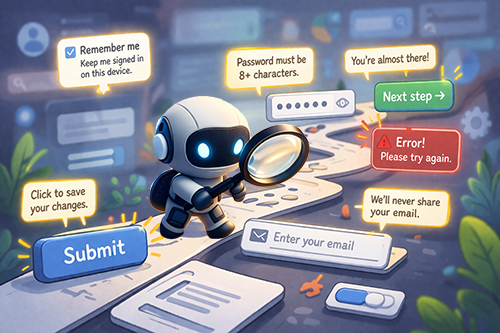
Microcopy is easy to underestimate. Let’s face it, it really doesn’t look like much. It’s a handful of words on a button. A line of helper text under a form field. A quick error message that shows up at exactly the wrong moment.
And yet, these fragments and phrases are often the difference between a smooth experience and a frustrating one. If you want to see where a user’s journey actually succeeds or fails, look at the microcopy.
What is microcopy?
Microcopy is the small bits of text or copy that you find throughout a product or website: Navigation item text, form field labels, button texts, error messages, etc. These are the little words or phrases that guide users on what to do, provide additional information, or offer reassurance. They help users navigate and understand a website. ~ Microcopy Explained, UXgem.com
It’s not long-form content, and it’s not storytelling.
It’s the text that shows up when people are trying to do something. It exists to move users forward. To help them understand what’s happening, what to do next, and whether or not they’re on the right track.
See more examples of microcopy and their application.
How Does Microcopy Work?
Its job is to guide the user's action with clear, specific labels, such as Create account or Download report, that remove guesswork; to set expectations (like password requirements or file size limits) upfront so users aren’t left trying to figure out the requirements mid-task; to support error recovery by turning them into next steps instead of dead ends; and to build trust (We will never sell your data.) that reduces hesitation.
Taken together, microcopy speaks almost one-on-one with the user, working best when it’s clear, timely, and in just the right tone.
Where accessibility comes in
Accessible microcopy is not just about being brief and succinct; it’s about being understandable, consistent, and inclusive.
First, clarity beats cleverness every time. Fun or branded language might catch a user's attention, but if it’s ambiguous, it slows everyone down as they try to decipher its meaning, especially for those who rely on predictable patterns or use assistive technology to navigate.
Second, consistency is a must. When similar actions use different labels, such as Next vs Continue, or identical labels produce different outcomes, users can become confused, frustrated, and forced to second-guess their next move. That cognitive load accumulates quickly, slowing engagement and eroding trust.
And then there’s tone. Accessible microcopy guides and informs without blaming. It avoids phrases that blame the user, such as You entered this wrong, and instead focuses on solutions like Your password must include at least 8 characters and a number.
To make microcopy truly accessible, make sure you:
- Use Descriptive Labels
- Avoid vague links like Click Here.
- Avoid vague links like Click Here.
- Prioritize Placement
- Place instructions before the action.
- Pro Tip: Screen readers navigate top-down. A hint placed after a form field is often missed.
- Opt for Live Text
- Never bake microcopy into images.
- Pro Tip: Semantic HTML ensures that everyone gets your message.
Why Accessible Microcopy Matters
The role of microcopy is evident when clarity, consistency, and tone are essential for success. Activities like submitting a form, correcting an error, or making a choice. These aren’t passive reading experiences; they’re critical points of action.
When microcopy is unclear, inconsistent, or inaccessible, users hesitate. They make mistakes, and sometimes they give up entirely.
But when done well, the experience feels easier, faster, and more intuitive. Not because your website or app changed, but because the communication did.
Accessible microcopy supports different ways of processing information. It meets people where they are: plain language, precise instructions, and descriptive errors create smoother, more inclusive experiences for everyone.
Resources
- Microcopy Explained
- Accessible Microcopy
- The 3 C’s of Informational Microcopy
- UX Copy Sizes: Long, Short, and Micro
- The 3 I’s of Microcopy: Inform, Influence, and Interact
- Microcontent: A Few Small Words Have a Mega Impact on Business
A human author creates the DubBlog posts. The AI tools Gemini and ChatGPT are sometimes used to brainstorm subject ideas, generate blog post outlines, and rephrase specific sections of content. Our marketing team carefully reviews all final drafts for accuracy and authenticity. The opinions and perspectives expressed remain the sole responsibility of the human author.
