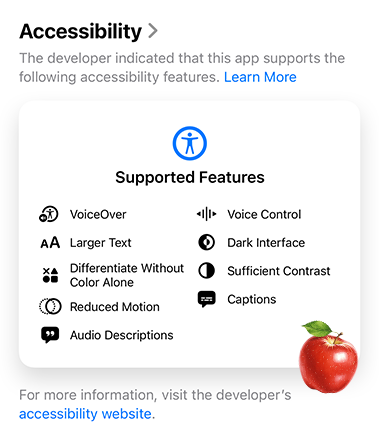
First unveiled on Global Accessibility Awareness Day 2025 and then expanded during Apple’s Worldwide Developers’ Conference 2025, Apple launched Accessibility Nutrition Labels in their App Store.
Accessibility Nutrition Labels provide developers and users with a quick, at-a-glance snapshot of what accessibility features an app supports.
Each label is broken down into key areas:
- VoiceOver - spoken feedback and gesture navigation
- Voice Control - hands-free interaction
- Larger Text - bigger fonts for easier reading (up to 200%+)
- Dark Interface - reduces strain in low light
- Sufficient Contrast - helps visually identify user interface elements
- Differentiate Without Color Alone - not relying only on color to convey information
- Reduced Motion - cuts down on dizzying animations
- Captions & Audio Descriptions - better media accessibility for deaf or blind users
Instead of digging through documentation or guessing whether an app plays nicely with assistive technology, you get a clear, standardized view of what’s built in and what’s missing before you download it.
Where Do I Find an Accessibility Nutrition Label?
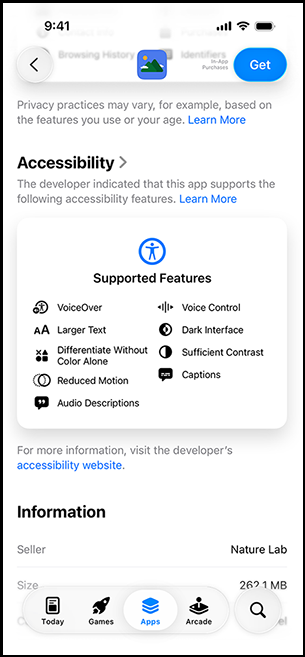
Finding these labels is very easy:
Open the App Store.
Search for an app you’re curious about.
Scroll down on the app’s product page, and you’ll see an Accessibility section. This is where the label is located.
If you don’t see the Accessibility section on the product page, there are a couple of reasons why:
The developer has not included it in their app.
These labels are part of the iOS 26 / App Store redesign. Therefore, older versions of iOS or devices might not show the accessibility section even if the information is available on the server.
Why Accessibility Nutrition Labels Matter
Until now, you basically had to know or hope an app was accessible. With these labels, accessibility is now something you can compare and filter on before you commit to a download. This is a big win for users with specific needs and a gentle nudge for developers to prioritize inclusive design.
Worth Noting
Apple’s Accessibility Nutrition Labels are currently optional. While there’s no set date for when they’ll become mandatory, Apple says developers will have plenty of time to review their apps and highlight the accessibility features they offer.
Resources
- Add an Accessibility Nutrition Label
- Overview of Accessibility Nutrition Labels
- Time to Prepare for Apple's Accessibility Nutrition Labels
- Apple’s App Store is getting ‘nutrition labels’ for accessibility
- Evaluate your app for Accessibility Nutrition Labels (YouTube)
A human author creates the DubBlog posts. The AI tools Gemini and ChatGPT are sometimes used to brainstorm subject ideas, generate blog post outlines, and rephrase certain portions of the content. Our marketing team carefully reviews all final drafts for accuracy and authenticity. The opinions and perspectives expressed remain the sole responsibility of the human author.
